Have an Invite Code?Click Here →

Shared, color-coded, free

The custody calendar app both parents can rely on.

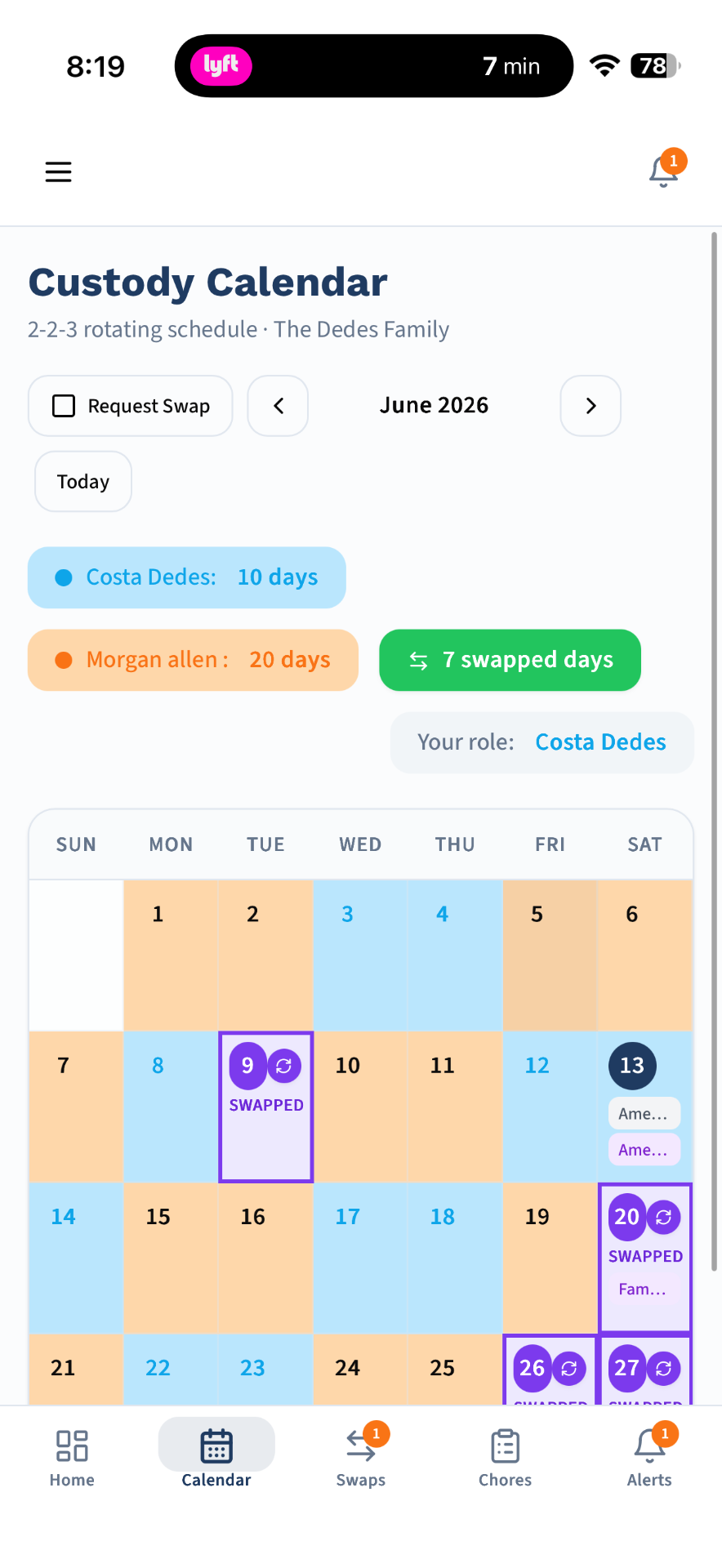
CustodyTrac gives you a shared, always-up-to-date custody calendar with every common rotation — 2-2-3, 3-4-4-3, week-on/week-off, every-other-weekend, or your own custom pattern. Swap requests, holiday overrides, and every schedule change are logged automatically.

100% free — no credit card, no trial, no paywall
Shared custody calendar with color-coded parent days

Every common rotation

2-2-3, 3-4-4-3, week-on/week-off, every-other-weekend — plus drag-and-drop custom patterns.

Color-coded by parent

See at a glance who has the kids each day, week, or month. Easy for kids to read too.

Change history included

Every calendar change is logged with a server-side timestamp for the record.

One calendar, both parents, zero screenshots

A shared custody calendar sounds obvious, but most co-parents are still managing schedules through a mix of text screenshots, printed PDFs, and iCal invites that neither parent trusts. When something changes, half of the family gets an outdated version.

CustodyTrac replaces all of that with a single source of truth. Both parents see the same calendar, synced in real time. Kids old enough to have their own account see a simplified view. Grandparents and step-parents get view-only access if you invite them. And every change is timestamped and logged automatically — so there's never a dispute about who agreed to what.

Rotations that actually match your custody order

Custody orders come in dozens of variations. CustodyTrac supports every common pattern out of the box:

  • 2-2-3 — the classic 50/50 rotation for younger kids
  • 3-4-4-3 — 50/50 with longer stretches
  • Week-on / week-off — the simplest 50/50 arrangement
  • 2-2-5-5 — a common tween/teen rotation
  • Every other weekend — the standard 80/20 fallback
  • Every third weekend — for long-distance co-parents
  • Custom — draw any pattern you need

Templates recur automatically for the full year. Holiday overrides slot in without breaking the underlying rotation. School-year and summer templates can be layered so the calendar shifts automatically when school lets out.

Swap requests keep both parents in sync

When one parent needs a schedule change, they send a swap request from directly inside the calendar: 'give-a-day' (I need Wednesday, take Thursday instead) or 'take-a-day' (I want to keep Saturday, you can have Sunday). The other parent gets a push notification and can approve, counter, or decline.

Nothing on the calendar changes until both parents sign off, and every request — approved or declined — is preserved in the audit trail. No more 'you never told me' arguments.

What you get

  • All common custody rotations supported (2-2-3, 3-4-4-3, week-on/week-off, every-other-weekend, custom).
  • Color-coded parent days for at-a-glance clarity.
  • Recurring templates that fill in the entire year automatically.
  • Holiday and vacation overrides that don't break the underlying rotation.
  • Swap requests with digital sign-off from both parents.
  • Real-time sync — changes appear on both parents' devices within seconds.
  • Change history and audit trail for every entry.
  • Free family access for step-parents, grandparents, and caregivers.
  • Kid-safe simplified view for child accounts.
  • Works on iPhone, Android, and any browser.

Frequently asked questions

What is the best custody calendar app?
The best custody calendar app is one that (1) supports the schedule rotation your custody order actually uses, (2) syncs instantly between both parents, (3) logs every change to an audit trail, and (4) doesn't require both parents to pay. CustodyTrac supports every common rotation (2-2-3, 3-4-4-3, week-on/week-off, every-other-weekend, custom) and is completely free.
Does CustodyTrac support 2-2-3 and 50/50 custody schedules?
Yes — 2-2-3, 3-4-4-3, week-on/week-off, 60/40, every-other-weekend, and any custom pattern you draw yourself. Templates recur automatically for the entire year and holiday overrides don't break the underlying rotation.
Can both parents edit the custody calendar?
Both parents can view and propose changes. Swap requests require the other parent to digitally sign off before the calendar updates — so nothing changes without both parents agreeing. Every change is logged in the audit trail with a server-side timestamp.
Does the custody calendar sync in real time?
Yes. Any change either parent (or the calendar's automations) makes appears on both parents' devices within seconds. Push notifications alert the other parent to swap requests, holiday overrides, and schedule changes.
Can I share the custody calendar with grandparents or a step-parent?
Yes. Family access lets you invite step-parents, grandparents, nannies, and other caregivers with view-only or edit-limited permissions. Adding family members is free and unlimited.
Is the custody calendar app really free?
Yes — the full calendar, swap requests, holiday overrides, change history, and family access are 100% free for both parents. No paid tier, no trial, no credit card required.
Free for both parents. Forever.

Every CustodyTrac feature is available at no cost. No paywalls, no upsells, no locked reports.

Create your free account